
Clearer form errors with Cleverbrush Framework
Xpenser connects API validation to individual form fields while preserving your input for correction and retry.
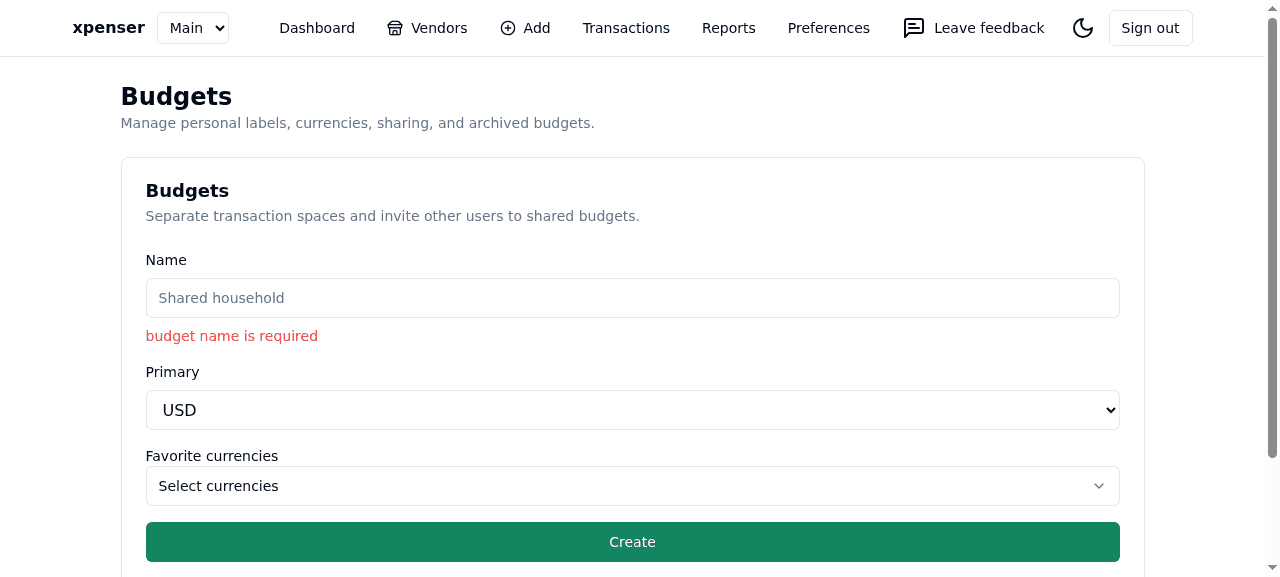
Cleverbrush form validation now connects Xpenser's server-side checks to the fields you are editing. When the API returns a field-specific validation error, the form shows it beside the matching control and keeps your input available for correction.
Correct a field without starting again
This applies to transaction and vendor forms, categories, budget settings, account preferences, API keys, feedback, and upload flows. Errors that do not belong to a visible field remain in the form's summary. Editing a rejected field clears its previous server error; a successful submission keeps the existing close, reset, or navigation behavior.
Category setup remembers rows that were successfully created before a later row failed. Receipt review similarly remembers an acknowledged transaction if the following scan confirmation fails. Retrying those steps avoids repeating a write that the app already knows succeeded. This does not make ambiguous network failures automatically safe to replay.
One validation path across the stack
Xpenser is also a reference application for Cleverbrush Framework. This update adopts beta 0.0.0-beta-20260930081248: the API supplies structured validation details, the client decodes them into JSON Pointer issues, and React Form attaches them to schema-bound controls.
Feature-specific Server Actions remain in separate files. A small shared boundary converts expected errors into plain results before Next.js transports them; unexpected failures still follow the normal error path. Forms return those results directly to the Framework submission controller instead of maintaining individual error parsers.
Explore the open-source expense tracker or the personal finance API and MCP tools to see how these shared contracts fit the rest of Xpenser.